

How to Stay Safe in Crypto: Guide + OPSEC Arcade
Crypto gives you full control and full responsibility. Learn how to secure your recovery phrase, choose the right wallets, check what you sign, and keep scammers at bay.


Unlike traditional finance, where there is usually someone to call and some consumer protections in place, in crypto, safety is often in users' own hands. Transactions are irreversible, there is a high level of pseudonymity, and there is generally either no safety net or a very thin one. Scammers know this and, unfortunately, use it to their advantage - only one wrong move can cost you your entire portfolio!
We’re here to save the day, though: with the full info and some practical tips in this article, staying safe is easier than you think! Bonus: you can determine which OPSEC character you are with a fun little arcade game!
The good news is that you do not need to be a cybersecurity expert to stay safe in crypto (even though it does help if you actually are) - a few good habits and best practices and you’ll be all set. Security is layered: starting from your account, then on to your device, your wallet, your transactions, and, ultimately, your identity. If one of these layers fails, the others may still be able to protect you if you’re doing things right!
TL;DR: note the golden rules & test your safety
Onchain safety isn’t rocket science, but it does require a few good habits. Protect your recovery phrase, secure your accounts and devices, use separate wallets for long-term holdings and random experiments, and always check what you're signing. Watch out for phishing, suspicious links, and urgent requests, review token approvals, protect your privacy, and make sure you can recover your wallet if something goes wrong.
The golden rules?
- Never share your recovery phrase
- Never sign what you don't understand
- Never let anyone rush you into a crypto decision
Are you ready to find out how good your security habits are? Play in our OPSEC Arcade and discover which character you are:

The most common ways people get in trouble
Scammers are getting super inventive lately, and the opportunities to get in trouble are endless. But below you can read about the most common ways people lose their crypto:
- Giving away their recovery phrase - whether because someone asked for it or because they stored it online
- Signing a dodgy transaction - phishing links, address poisoning, or simply not reading what they sign can mean loss of funds
- Getting tricked - If someone posts about a problem on social media or in a community, they're often flooded
- Losing access - forgetting where the recovery phrase is stored, or writing it down with a typo, can mean they can no longer access their crypto
Protect your recovery phrase & practice recovery
This will be no news to experienced crypto users, but for those of you just starting out, this is a crucial piece of information (and a good reminder for OGs, too): your crypto wallet does not actually store crypto. The assets exist on the blockchain, and your wallet manages the keys that you use to access and control them. Therefore, your private key/recovery phrase is the master key.
Do not treat your recovery phrase like a password (because it isn’t one): it cannot be reset, doesn’t allow for 2FA, and you won’t be notified if someone is trying to access your wallet.
Therefore, the golden rule is: DO NOT SHARE YOUR PRIVATE KEY OR RECOVERY PHRASE with anyone. This matters most when someone claiming to be customer support contacts you. Legitimate providers will never need it, and if someone asks for it - RUN!
Back up your wallet and practice recovery
What happens if you lose access to your accounts? We can sometimes be our own worst enemy!
Now, don’t get paranoid, but your phone could break. Your computer could be stolen. Your hardware wallet could be lost or damaged. Without a working recovery method, you could lose access to your assets even if nobody ever hacks you.
Store your recovery phrase securely
Write down your recovery phrase during wallet setup and store it somewhere secure. A sticky note on your laptop simply won’t cut it!
It’s best to avoid taking screenshots or storing unencrypted copies in email, messaging apps, cloud storage, or documents accessible from your everyday devices (including your Notes app!). These can expose your recovery phrase to malware or account compromise.
If you keep multiple backups, make sure they don't all depend on the same location. A single incident (e.g., a house flood or fire) shouldn't destroy every copy.
Test your recovery process
Having a backup isn't enough. You need to know that it actually works. When using any wallet, understand how your particular wallet handles recovery and make sure you can follow the process correctly.
Where practical, test your recovery procedure using a separate test wallet or another safe method that doesn't put your existing funds at risk. Never enter your real recovery phrase into a random recovery website to test it.
Think about the future
If you hold substantial assets, consider what would happen if you became unable to access them. Would someone you trust know how to recover them? Could they find the necessary instructions without compromising your security today?
You don't need an elaborate inheritance plan for every wallet, but you should understand the consequences of permanently losing access.
Remember, a backup you can't find, can't read, or don't know how to use isn't much of a backup.
Secure your accounts and devices before you secure your crypto
Your crypto security is only as strong as the accounts surrounding it. And while this section doesn’t necessarily relate directly to your crypto assets, there are some great tips here for your general digital safety.
If someone gains access to your email, exchange account, or password manager, they may be able to compromise other parts of your digital life. So we recommend you start with these basics:
Use strong, unique passwords
We are probably all guilty of using the same password across multiple services. Yes, it may be convenient, but it also creates a single point of failure.
We recommend:
- Use a unique password for every important account
- Make passwords long and difficult to guess
- Use a reputable password manager to generate and store them - this way you don’t remember them all, just one master password
- Never share your passwords with anyone
BREAKING: A hacker accessed Denmark's national ID database with the password "123456," exposing details of 8.8 million people
— Kalshi (@Kalshi) October 15, 2026
Enable two-factor authentication (2FA)
Two-factor authentication (2FA) adds another layer of protection by requiring something beyond your password to verify your identity. Consider a hardware security key or an authenticator app. SMS-based authentication could be vulnerable to attacks such as SIM swapping, so it's worth opting for a stronger alternative when you can.
Enable 2FA on your email, exchanges, and other important accounts. 2FA is especially important for your email since it is often the gateway to password resets and account recovery.
Keep your devices secure
Your wallet doesn't operate in a vacuum. The phone or computer you use to access it can also introduce security risks - in a nutshell, your device is a part of your wallet setup!
Malware, malicious browser extensions, fake wallet applications, and compromised software can all put your assets at risk. This doesn’t mean you need a dedicated crypto computer or phone, but you should take reasonable precautions to protect your devices. Here are some tips for that:
- Keep your software up to date: Install security updates for your operating system, browser, and wallet software. Updates frequently address vulnerabilities that attackers could exploit.
- Use a screen lock: Protect your phone and computer with a strong passcode, password, or biometrics, and automatic screen locking. Privacy screens are also popular for both mobile phones as well as laptops - especially if you travel often or work from a co-working space, e.g.
- Be selective about what you install: Avoid cracked software, suspicious downloads, and browser extensions you don't genuinely need. Download wallet applications ONLY from official sources rather than random links. Best if you do not Google search for software or extensions but use verified sources only.
- Be careful with remote access: If a stranger claiming to be support asks you to install remote-access software or share your screen while opening your wallet, please stop. They may be trying to gain access to your device or trick you into revealing sensitive information.
And if you're managing significant holdings, consider using a separate wallet or device for higher-risk activities. Which brings us to our next point about the importance of choosing a wallet.
Choose the right wallet for the job
Not every wallet needs to hold everything you own. In fact, we recommend against keeping all your assets in a single wallet because one of the simplest ways to reduce your risk is to diversify your wallet portfolio, or simply put, separate your long-term holdings from the wallet you use for everyday crypto activities.
You could think of it like the difference between a savings account and the cash in your pocket.
What to look for in a wallet
Not all crypto wallets offer the same level of protection, and choosing the right one for you usually involves more than comparing features or looking for the lowest fees. A good wallet should offer:
- Control over your assets while helping you understand what you’re doing before you approve a transaction
- Clear transaction details & a user experience that makes it easier to spot suspicious activity rather than blindly click through it
- Tools to manage token approvals
- Strong security options
- It should also fit how you use crypto: you might want different wallets for long-term holdings, everyday transactions, and experimental DeFi activity. Most importantly, remember that a wallet can help you make safer decisions, but it can’t eliminate risk. Your habits still matter!
A long-term wallet
Ideally, this is where you keep assets you don't need to access frequently. For significant holdings, consider a hardware wallet. It keeps your private keys isolated from your everyday computer or phone, reducing their exposure to many online threats.
Only buy hardware wallets from the manufacturer or an authorized reseller, set them up yourself, and generate your own recovery phrase. Also, always check the packaging before you use them - if the packaging looks compromised, the wallet may be too!
You could also look into multisig wallets. They require approval from multiple keys before a transaction can be executed: you can set a rule such as 2-of-3, meaning at least two out of three designated signers must approve each transaction. This is still not foolproof (because compromised signers or poorly configured permissions can still put funds at risk), but it still adds an important layer of security.
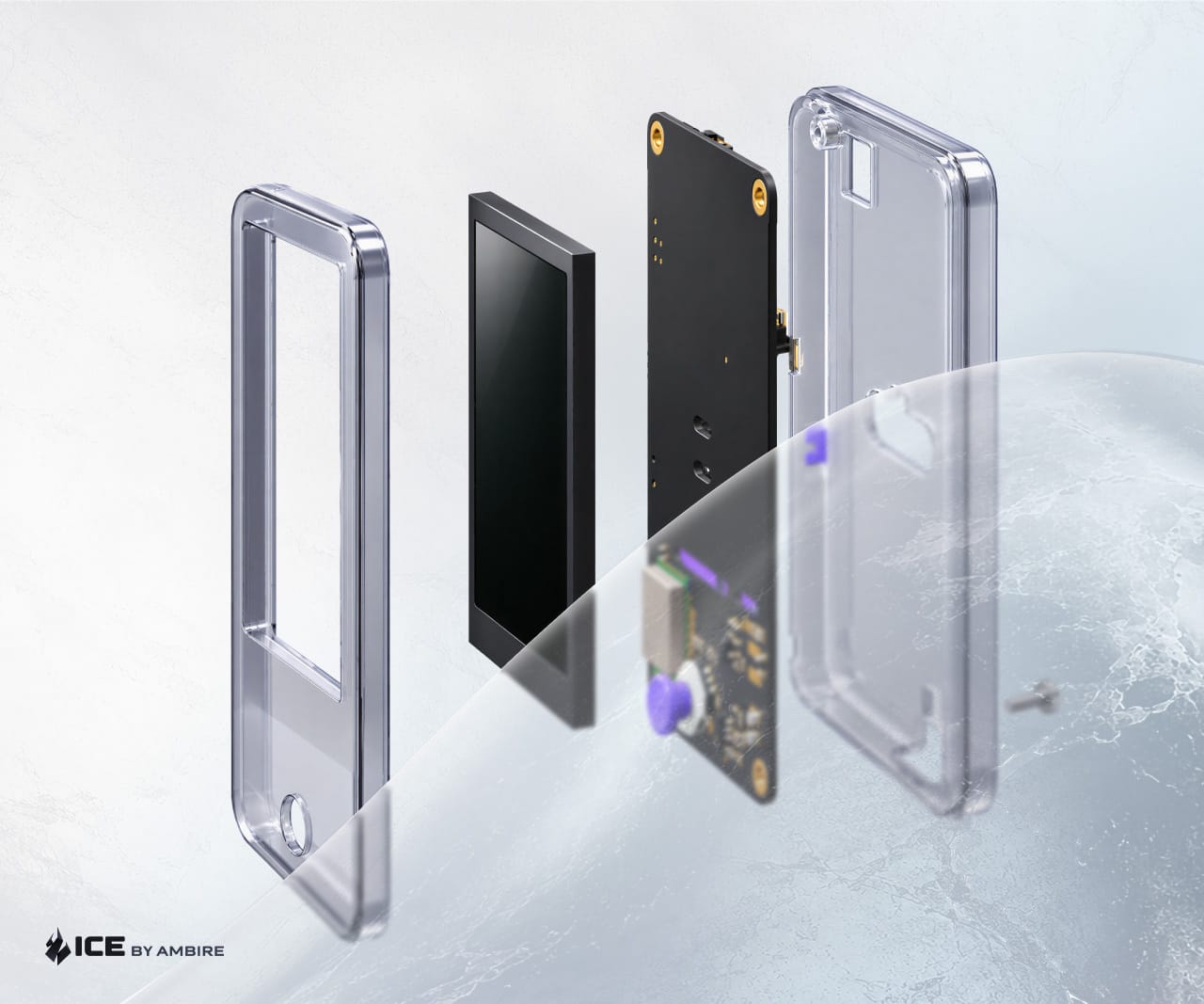
Ambire lets you import and manage existing Safe multisig accounts directly from its interface. You can initiate transactions, collect the required signatures, and batch multiple actions (such as token approvals, swaps, and transfers) into a single Safe transaction. Crucially, Safe’s underlying security rules remain unchanged: Ambire simply makes multisig easier to manage without replacing the protections provided by Safe itself. Ambire is also building Ambire Ice, an open-source hardware wallet for Safe. Reservations are open, with the first batch delivery expected in early 2027. Secure yours now!
An everyday wallet
This is the wallet you use for more regular activities such as swapping tokens, bridging between networks, and interacting with DeFi applications. You would want it to be convenient, but remember that convenience shouldn’t mean compromise.
Choose a wallet with security features that help you understand what you're doing before you approve it, that shows appropriate warnings for suspicious websites, a wallet that has been properly audited, and that has security and privacy by default, etc.
An experimental wallet
Want to try an app you haven’t used before, claim a possibly questionable airdrop, or play around with a new protocol?
Then we suggest you consider using a separate wallet with only the funds you need for that activity. This won't make the interaction safe if it turns out to be malicious, but it can limit the damage if something goes wrong since you won’t lose your entire life savings.
The rule of thumb: Don't expose your entire portfolio to every new thing you try.
One important caveat: a hardware wallet is not a magic shield. It helps protect your private keys, but it can't save you from every scam. If you authorize a malicious transaction yourself, then simply the fact that you used a hardware wallet would not save your funds. That's why the next step matters so much.
How Ambire can protect you
Here are just some of the security measures and features Ambire offers:
- Manage hot wallets, as well as hardware wallets; add multiple accounts; import Safe multisig accounts too
- See what the outcome of a transaction would be before you sign it with advanced transaction simulation
- Understand what you sign: it supports clear signing and humanizes transactions so you can see in plain language what you’re doing
- A built-in app catalog with 500+ verified apps inside the wallet protects you from fake websites and dodgy links
- Warns you if your balance is about to change drastically and when you’re about to interact with risky apps, contracts, and addresses
- Offers privacy by default
DYOR (Do your own research)
Like everything else in crypto, we recommend you do your own research. There is plenty of scaremongering out there, and plenty of myths about specific wallets and features. For example, some people believe that EIP-7702 smart accounts are unsafe. Upgrading your account through your wallet's own audited contract doesn't change who controls it: your keys still do. Take the recent Binance hack: around $6.3 billion was taken after attackers compromised Binance's signing systems. EIP-7702 helped them sweep funds faster, but Blockaid's Ido Ben-Natan and Ambire's Ivo Georgiev both noted the attackers could have done it without it. Read more in our breakdown of common EIP-7702 misconceptions.
Check before you sign
If there's one habit we recommend to every crypto user to develop, it's this:
Understand what you're signing before you approve it.
When you interact with a crypto app, your wallet may ask you to sign a transaction or a message. Depending on what you're approving, this could transfer tokens, interact with a smart contract, or grant permissions to another application.
The problem? A transaction can be malicious even when the website looks legitimate. Scammers can create fake apps that encourage users to connect their wallets and approve transactions that transfer assets or grant dangerous permissions in both the short and long term.
Before signing, ask yourself these five questions:
- What am I doing: Am I sending tokens, swapping assets, bridging funds, or interacting with a smart contract?
- Who am I interacting with: Have I verified the application and its official website?
- What am I authorizing: Does the transaction match what I intended to do?
- What will happen to my assets: Do the amounts and expected balance changes make sense?
- Am I being rushed: Is someone pressuring me to approve something immediately?
If you can't fully understand what a transaction does, don't sign it until you've done more digging and are satisfied that the app/website is legit, and so is the transaction.
Use transaction previews and simulation
Some wallets, like Ambire, support clear signing and offer transaction simulation, which estimates and displays what a transaction will do before it's submitted to the blockchain.
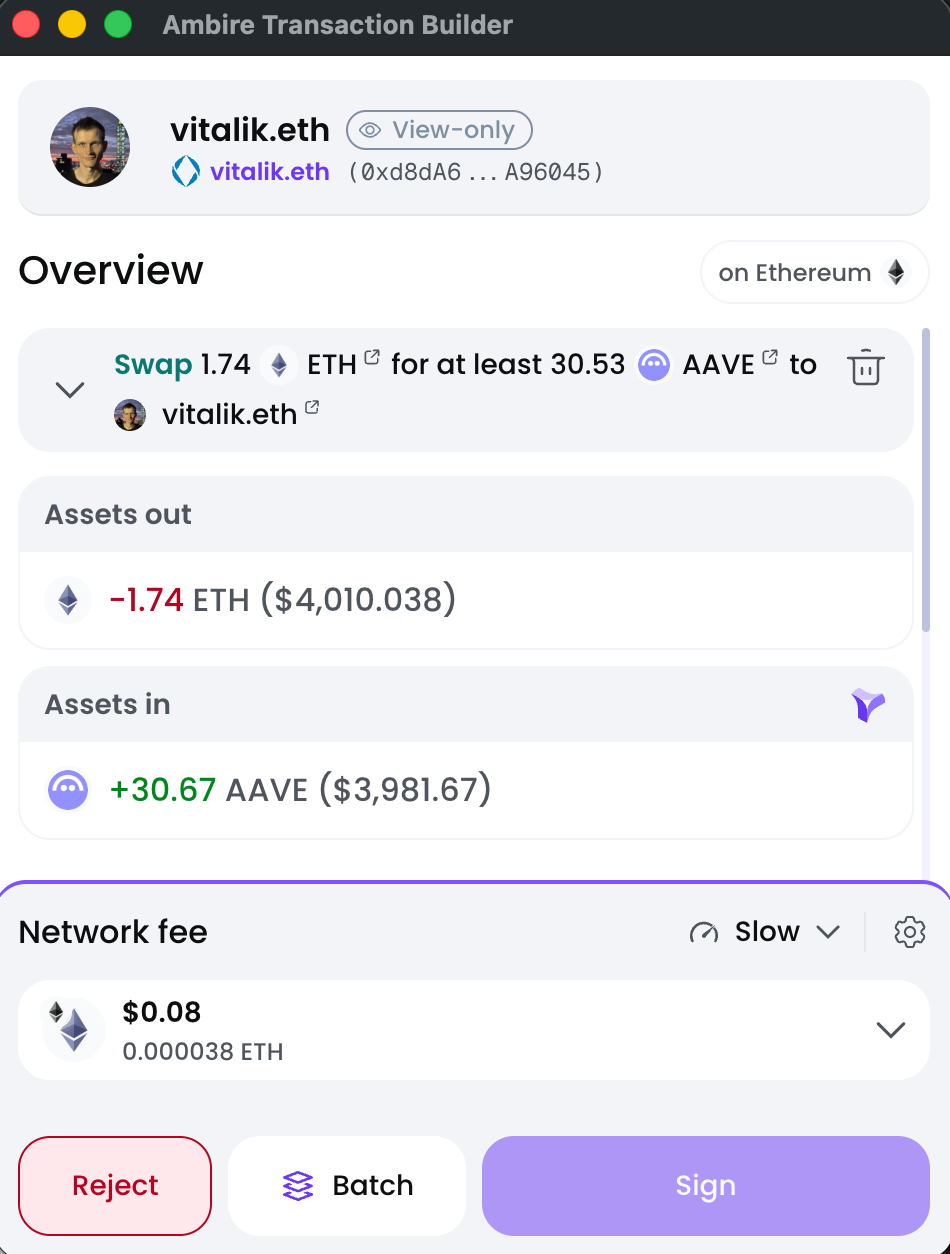
For example, a simulation may help you spot unexpected token transfers or changes to your balances before you approve an operation. This tool adds a valuable layer of protection, but on its own it isn’t a guarantee that every malicious transaction will be detected. It should be combined with other best practices.
Always review the information available to you, and don't approve something you don't understand.
Double-check addresses and networks
Sending crypto to the wrong address or using an incompatible network can result in lost funds since transactions are irreversible.
Before transferring assets, we recommend that you:
- Verify the full recipient address, not just the first and last few characters.
- Check that you're using the correct network.
- Confirm the asset and amount.
- Be alert to address-poisoning attacks, where scammers create addresses resembling ones you've previously used.
- For a new recipient, consider sending a small test transaction and confirming it went through before transferring a large amount.
- Use an address book where available (e.g., Ambire lets you save addresses in the address book, and it will warn you the first time you send funds to a new address)
Copying an address from your transaction history isn't always safe. An address-poisoning scam could place a similar-looking address in your history in the hope that you'll copy it by mistake. Take the extra few seconds to verify the details. We promise it's worth it.
🚨 ALERT: A user lost $50,000 in $USDT to an address poisoning attack on Ethereum, according to Scam Sniffer.
— Cointelegraph (@Cointelegraph) October 28, 2026
Always verify the full wallet address before sending funds. pic.twitter.com/qP8AHorANL
Understand (and review) token approvals
Approvals are something that sometimes catches even experienced crypto users off guard, especially old, long-forgotten approvals.
In some scenarios, interacting with an app doesn't simply involve sending tokens. You may also be granting a smart contract permission to spend tokens from your wallet. This permission is called a token approval.
For example, a decentralized exchange may need permission to access your tokens so it can complete a swap. The danger comes when you grant a contract permission to spend more than it needs - also referred to as unlimited approvals, particularly if that permission remains active indefinitely. If the contract is compromised or malicious, an excessive approval could put your tokens at risk, even years after the approval was granted.
How to protect yourself
- Review what you're approving: Check which token, the amount, and which contract the approval applies to.
- Avoid unnecessary unlimited approvals: Where possible, approve only the amount required for the action.
- Review old permissions: Periodically check your existing approvals and revoke those you no longer need. Remember that revoking an onchain approval may require a transaction fee, but with Ambire and revoke.cash e.g., you can batch multiple transactions and revoke all approvals as one.
- Use wallets that help minimize unnecessary permissions: Ambire's smart account architecture can batch an exact token approval with the action that needs it. This avoids lingering open approvals after execution, where the app supports this functionality.
The broader lesson is simple: connecting your wallet and giving a smart contract permission to spend your tokens are not the same thing. Understand the difference before you approve anything.
The best time to revoke is before an exploit happens.
— Revoke.cash (@RevokeCash) September 26, 2026
The Payment Processor approvals drained this week were mostly from 2024. They had been stale for over a year. $2.8M+ stolen so far.
Revoke Ultimate auto-revokes approvals older than 180 days. Subscribe for peace of mind. pic.twitter.com/NVr4IS3IfH
Learn to spot phishing and scams
Crypto scams come in many forms, but most rely on a familiar combination of trust, urgency, and an attractive promise. You might encounter:
- Fake airdrops and token claims
- Impersonators posing as wallet support
- Fake websites that imitate legitimate apps
- Messages claiming your wallet has been compromised
- Giveaways promising to multiply your crypto
- Investment opportunities promising guaranteed returns
- Scammers offering to recover assets you've already lost
Some scams are obvious. Others don’t look like scams at all, and are convincing enough to fool experienced users. Deepfakes are getting better and harder to identify, and scams are becoming more elaborate.
ALERT: A phishing site is appearing as the top sponsored Google result for @Trezor, with the scam page already draining funds from unsuspecting users. pic.twitter.com/cDy3PcHK0L
— CoinDesk (@CoinDesk) August 7, 2026
Watch out for unsolicited messages
Let’s imagine a scenario where you post a (generic) question about your wallet on social media. A few minutes later, someone claiming to be from the support team contacts you privately. They say there's a problem with your account (or they may offer to help you with your question/issue) and that you need to verify your wallet immediately.
Then they send you a link. The website looks legitimate. The support agent sounds helpful. And you're worried about losing your funds. Well, this is precisely the kind of situation scammers exploit. Here are some common phishing channels:
- X (Twitter) DMs
- Telegram
- Discord
- Fake support accounts
- Fake wallet websites
- Fake airdrops
- Fake token claims
- Google/search ads
- Fake browser extensions
Remember: never share your recovery phrase or private key, and don't install software or follow instructions from an unverified support agent. If you need help, find the official support channel yourself rather than relying on links in unsolicited messages.
Watch out for urgency
Scammers use psychological tricks and know that urgency often makes people make rash decisions they regret later on. So they often create fake deadlines to exploit this human vulnerability, e.g.:
- "Claim your tokens in the next 10 minutes."
- "Your wallet will be suspended unless you act now."
- "This investment opportunity closes tonight."
- "Connect your wallet immediately to prevent losing your funds."
Urgency makes people act before they think. When a message pressures you to act immediately, take a step back.
Here is what we recommend in such situations:
- Take your time: don't click, sign, send funds, or share information immediately.
- Analyze and review: does the request make sense? Why is someone asking you to act so urgently?
- DYOR & Open the official website yourself: Don't rely on links sent to you by strangers.
If you remember nothing else from this section, remember this one thing: you never need to rush into giving someone access to your wallet.
Protect your privacy, not just your wallet
Security isn't just about protecting your wallet from hackers. It's also about reducing the amount of information strangers can use against you. This is where operational security, or OPSEC, comes in, and it relates not only to crypto but to other parts of your life, too.
OPSEC means thinking carefully about what information you reveal and where, who can access it, and how different pieces of information could be combined to complete a puzzle and expose your address, workplace, etc.
Of course, this doesn’t mean you need to disappear from the internet or use a different laptop for every activity. But a little awareness goes a long way to avoid doxxing.
Don't advertise your holdings
Posting a screenshot of your portfolio/wallet or bragging about a profitable trade might feel harmless. But publicly connecting your identity to substantial crypto holdings can make you a more attractive target for phishing, impersonation, and other forms of social engineering (or in some extreme cases: even IRL physical threats).
Be mindful of what you share, particularly when screenshots contain wallet addresses, account information, or other personal details, and who you share it with (in a DM, on social media, etc.).
Remember that blockchain activity is public
On public blockchains, transactions and wallet balances can often be viewed by anyone. Even if your wallet address doesn't contain your name, other information may help people connect it to your identity. Especially if you have used a naming service like ENS domains, etc to give your account a nickname, which may link to your social media accounts and more.
For example, posting a wallet address on your public social profile can link your online identity to its full transaction history. Think carefully before linking personal accounts to wallets you use for different purposes.
Separate identities where appropriate
If you have a crypto pseudonym, consider whether you want that identity linked to your personal social media accounts or you want to keep things completely separate.
Reusing the same username, profile picture, and personal details across multiple platforms can make it easier for others to connect the dots.
Here it’s good to note that good OPSEC isn't about being paranoid. It's about sharing information intentionally rather than accidentally.
At the end of this article, we have prepared a little personality quiz game to help you identify your OPSEC persona; make sure to take it and even share your results!
What to do if something goes wrong
Even if you follow every security recommendation, mistakes can happen. If you suspect your wallet has been compromised, act quickly, but don’t panic. The right response depends on what happened.
You signed a suspicious transaction or a “bad” approval
If you approved a token allowance you no longer trust, revoke it as soon as possible using a reputable approval-management tool. If you signed a suspicious transaction, check what it did and whether any further permissions remain active. Revoking an approval can prevent future use of that allowance, but it won’t reverse a transaction or recover funds that have already been stolen.
Your recovery phrase or private key has been exposed
Just act as if the wallet is compromised. Create a new wallet with a brand-new recovery phrase, ideally using a trusted device (or a new device if you suspect malware on your device), and move any remaining assets to it as soon as you safely can. Never reuse the exposed phrase, and never enter your new phrase into a website or share it with anyone claiming they can help.
You’ve been scammed, or your funds have been stolen
Save the evidence before you potentially lose access to it. Record the transaction hashes, wallet addresses, dates, amounts, relevant URLs, and any messages or screenshots related to the scam. Report the incident to your local police or appropriate cybercrime authority. If the funds were sent to a centralized exchange, contact its official support team promptly and provide the transaction details; the exchange may be able to flag the receiving account, although recovery is not guaranteed.
Be wary of anyone who contacts you promising to recover your crypto for an upfront fee. Recovery scams often target people who have already lost money.
And always remember the golden rule: Never share your recovery phrase, never pay a stranger to recover your funds, and don’t assume that a transaction can be reversed (spoiler: onchain actions cannot be reversed). Acting quickly and preserving evidence can help limit further damage.
Build your personal crypto security stack
By now, you might be thinking that staying safe in crypto sounds like a full-time job. Don’t worry, it doesn't have to be.
The best security setup is one that matches your needs and that you'll actually maintain. Here are some sensible starting points:
If you're new to crypto
Start with the essentials:
- Use strong, unique passwords
- Enable 2FA on important accounts
- Keep your recovery phrase offline
- Keep your devices and software updated
- Verify addresses and networks before sending funds
- Never sign transactions you don't understand
- Be suspicious of unsolicited messages and offers
If you're actively using DeFi
All of the above, and consider adding these:
- Separate your long-term holdings from your everyday/experimental wallet
- Review transactions and token approvals carefully
- Use transaction previews and simulation where available
- Check the authenticity of apps before connecting
- Periodically review and revoke unnecessary permissions
If you're protecting significant holdings
Think about additional safeguards:
- Hardware wallets
- More robust backup arrangements
- Multisig wallets, e.g Safe, where multiple independent approvals are required to authorize a transaction
- Spending limits and other available account-level protections
- A documented recovery plan
Multisig setups can reduce reliance on a single key or device, but they also introduce additional complexity. Choose an arrangement you understand and can recover reliably.
You don't need every possible security measure right from the beginning. Start with the basics, understand your risks, and add more protection as your needs grow.
Play the OPSEC Arcade to determine your character

Think you’re doing ok? Got your security under control? It’s time to find out for real. We prepared a quick 20-question self-assessment game that identifies whether you’re a hacker’s wet dream or their mortal enemy, and helps you take actionable measures to improve your security.
Answer honestly; nobody is judging you. Well, maybe we are, a little. LFG:
Final thoughts: Stay curious, stay cautious
Crypto is an exciting space, but things can turn sour fast if you don’t take your security into your own hands. You don't need to distrust everyone or spend your life worrying about getting hacked. You just need to slow down when something feels suspicious, protect your keys, and build habits that help you make better decisions in the long run. Remember the fundamentals:
Protect your keys. Secure your accounts. Verify what you sign. Question random messages. Back up your wallet.
And when someone promises you free money if you connect your wallet in the next five minutes? You probably know what to do.
Stay safe out there. Your future self will thank you. And if you’re still on the lookout for an easy-to-use, yet secure and private wallet, try Ambire and build a safer way to manage your crypto.
Interested in Ambire? Follow us:
Discord | X (Twitter) | Reddit | GitHub | Telegram
